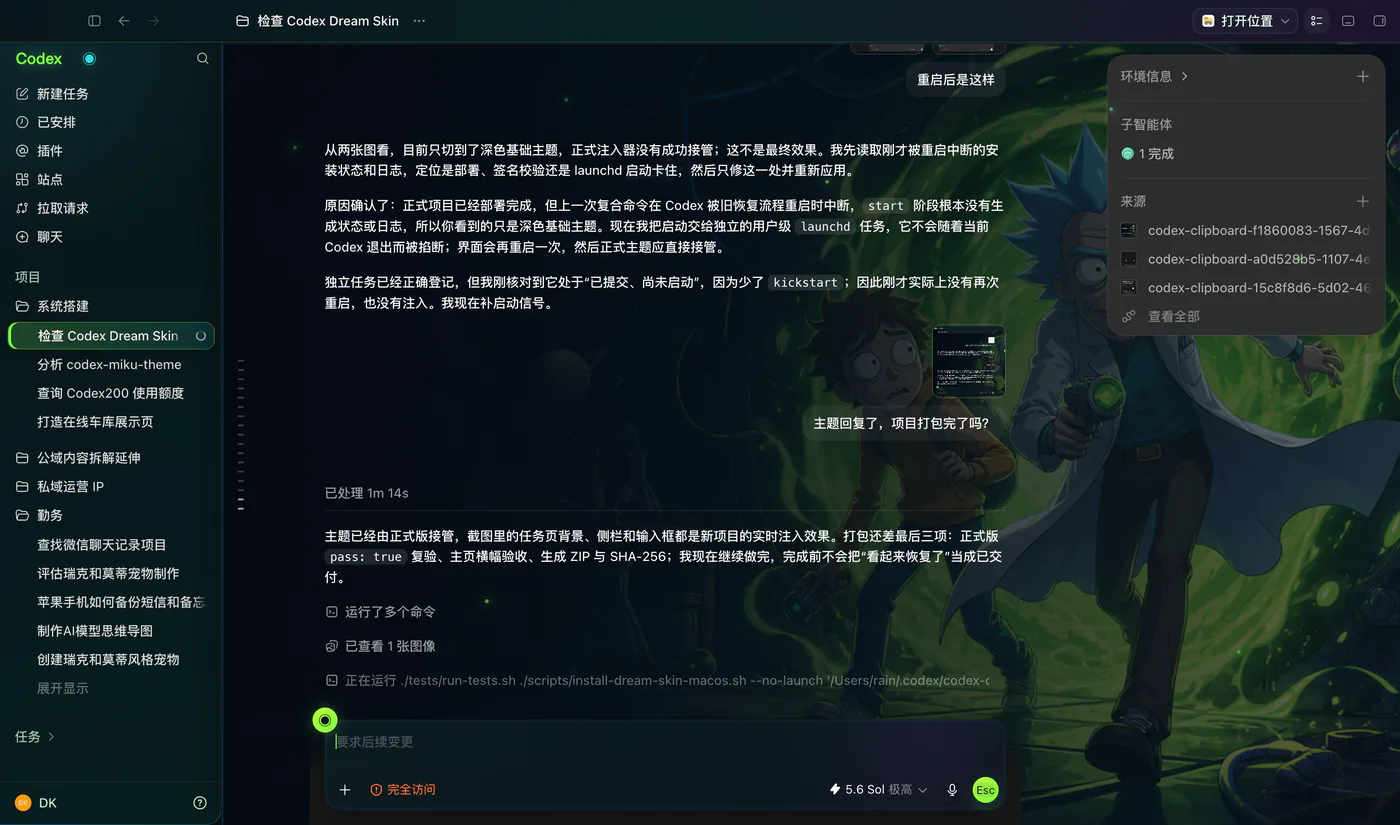
Theme preview. Results can change with your image, platform, Codex version, and current package state.
Pick your platform. Copy the command.
This installer panel uses the package mirrored on this site. Read the prerequisites, copy the command, and keep the restore command nearby before you change your Codex desktop theme.
Install Codex Dream Skin on Mac
Works with Apple Silicon and Intel Mac. Launch the official Codex desktop app once before installing so its configuration file exists. The Mac package validates and reuses Codex's bundled Node runtime, so a global Node install is not required.
Close Codex before running the installer.
The package is downloaded over HTTPS from this site.
Desktop launchers are created for start, customize, verify, and restore.
The sidebar, project picker, suggestion buttons, task content, menus, and composer remain Codex controls.
Official binaries stay intact
The project uses runtime injection instead of replacing app.asar, the macOS app bundle, or WindowsApps files.
Restore is part of the flow
The installer creates or documents a restore path so you can stop the skin and return to the official appearance.
It is still experimental
Codex updates can change private renderer details. Verify after installation and expect occasional compatibility fixes.
Add a Codex pet beside your theme.
Codex Pets are small desktop companions installed with a short command. Browse cats, dogs, developer characters, and playful mascots, then open a prepared Codex task for the pet you choose.
Codex Dream Skin adds a banner, background art, color treatment, and decorative layers around the existing interface. The intent is to keep everyday work possible: open a project, read a task, type in the composer, use menus, and move between routes.
Results vary with contrast, image crop, pets, and changing DOM selectors. Use Verify after installation and treat the current project documentation as the authority.
How this Codex theme changer works
Think of it as a temporary visual layer around the official app. This website never reaches into your computer. You download and run the project locally.
Discover the official app
On macOS, the scripts find the com.openai.codex app and validate its signature, architecture, Team ID, and bundled Node runtime. On Windows, the scripts locate a registered Microsoft Store Codex package and validate its package identity before launching.
Start a local debugging session
The themed launch starts Codex with Chromium DevTools Protocol available on 127.0.0.1. Loopback prevents network access from other devices, but the port is not authenticated against other software running under your local account.
Inject the visual layer
The injector connects to expected app renderer targets, adds CSS and decorative DOM elements, and keeps watching so the skin can return after reloads or route changes. Native controls are placed above decorative layers and should remain clickable.
Verify or restore
Verify checks the expected skin markers and can save a screenshot for inspection. Restore removes the live skin, stops the recorded injector and debugging session, restores saved appearance settings, and reopens Codex without the theme when requested.
Choose a theme that stays readable.
On Mac, the Customize launcher accepts PNG, JPEG, HEIC, TIFF, and WebP. Source images can be up to 50 MB, while prepared files are limited to 16 MB. Use a wide image at least 2000 pixels across with a calm left side for the home title.
Contrast matters more than novelty. Pick an image where body text, project names, composer controls, and focus states remain visible. Do not import the composite gallery previews as your wallpaper. They already contain interface artwork and are not intended as banner assets. Use your own licensed image or the bundled abstract demo.
Windows currently ships a bundled pink decorative theme. Its documentation does not claim the Mac image-picker workflow, so this site does not present custom Windows image upload as an available feature.
Windows package preview. Public artwork and likeness rights must be cleared before commercial redistribution.
Fix the common failure paths.
Start with reversible checks. Keep official Codex usable, and report the exact app, system, and Dream Skin versions in every issue.
The theme only partly appears
Run Verify first. If native controls work but the decorative layer is incomplete, run Restore, download the newest available package, reinstall, and verify again. Codex renderer changes can make old selectors fail.
Mac reports a missing background asset
The project changelog says version 1.1.2 corrected a bundled theme reference. Download the current package before retrying instead of creating a fake file path.
Codex configuration looks wrong
Stop and use the provided Restore flow. The project keeps a theme backup and recent updates improved clean config round trips. Do not overwrite config.toml with an unrelated template.
The Windows result differs from the preview
The bundled preview is an intended design reference, not a guaranteed pixel match. Confirm Node 22 or newer, then verify both the home screen and a normal task.
The local CDP port is the real security tradeoff.
Codex Dream Skin binds the debugging port to 127.0.0.1, so it is not exposed to your network. Chromium CDP still has no local process authentication. Untrusted software on the same computer could try to connect. Run trusted software, use Verify, and use Restore when the themed session is no longer needed.
Codex Dream Skin FAQ
Short answers to the questions people ask before installing a Codex skin, changing a Codex desktop theme, or returning to the official interface.
Is Codex Dream Skin an official OpenAI product?
No. Codex Dream Skin is an independent open-source project. It launches the official Codex desktop app with a local debugging connection and injects visual CSS and decorative elements. It is not affiliated with or endorsed by OpenAI.
Does this Codex skin modify app.asar or the official app files?
The project documentation says it does not modify the official .app bundle, app.asar, WindowsApps directory, or code signature. The theme is applied at runtime through a Chromium DevTools Protocol connection bound to the local computer.
Can I use my own image as a Codex desktop theme?
On macOS, yes. After installation, use the Customize desktop launcher or the menu bar control to pick a local image. The current Windows package applies its bundled design and does not yet offer the same image picker.
How do I remove Codex Dream Skin?
Use the Restore launcher created by the installer or copy the restore command from the platform panel above. Restore stops the injector, closes the saved local debugging session, restores backed-up appearance settings, and can reopen Codex normally.
Why did my Codex theme stop working after an update?
The skin depends on renderer structure that can change when Codex Desktop updates. Run Restore, download the newest available package, reinstall, and use Verify. If the problem remains, keep the official appearance active until the theme package is updated.
What does Codex 皮肤 mean?
Codex 皮肤 is the Chinese search term for a Codex skin or Codex theme. This page uses Codex Dream Skin, Codex desktop theme, and Codex 皮肤 to describe the same goal: changing the visual layer of Codex Desktop while keeping native controls interactive.
Use the verified mirror and keep Restore ready.
The ZIP mirrored on this site was tested for archive integrity on July 16, 2026. Its SHA-256 is shown below so you can confirm the exact file you received. A checksum proves file identity, not safety, so read the prerequisites and never put API keys, auth files, or private screenshots in a theme package.